Add a Jama Connect Interchange connector
Add a Jama Connect Interchange connector and use a Jama Connect service account to connect to a Jama Connect tenant.
Requirements
Admin access in Jama Connect Interchange.
A Jama Connect service account.
The Jama Connect base URL for the target tenant.
The Client ID and Client Secret for the Jama Connect service account.
You can manage multiple Jama Connect tenants from one Jama Connect Interchange instance, but you must set up each tenant separately.
To add the connector:
In Jama Connect Interchange, select Connectors, then select Add Connector.
In the window that opens, complete the fields.
Name — Enter a name for the connector.
Application — Select Connected Service.
URL — Provide the Jama Connect base URL for the target tenant.
Client ID — Provide the ID from the Jama Connect service account.
Client Secret — Provide the ID from the Jama Connect service account.
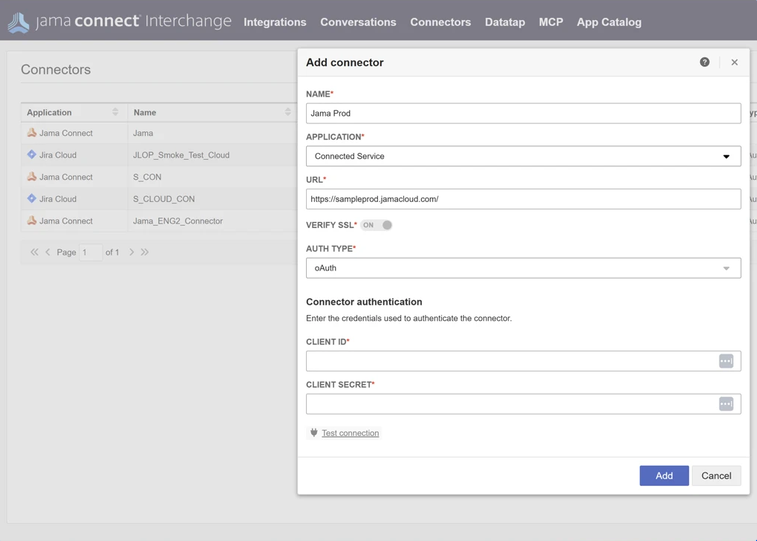
Select Test connection to verify the connection.
Review the connection result, then select Add.
After you add the connector, use it to administer Jama Connect Webhooks and configure Jama Connect MCP.