Configure round-trip settings for ReqIF import and export
Round-trip exchanges involve multiple back-and-forth imports and exports of the same dataset. On subsequent updates, the original requirements in Jama Connect must be located and updated, rather than duplicated. To facilitate this, requirements in Jama Connect are matched to the corresponding spec objects in the ReqIF file and those matches are maintained throughout the life of the exchange.
When you configure your round-trip exchanges, you are prompted to select the type of matching, the extent of the scoped updates, and import and export settings.
Note
Round-trip exchanges are not supported for baseline or filter exports.
Matching methods
In each ReqIF conversation in Jama Connect Interchange, you can choose which matching methodology to use for round-trip exchanges:
Jama Connect matching — (Default) Automatically pairs Jama Connect API IDs with ReqIF identifiers and maintains these associations within the conversation. This method requires no configuration. However, the same conversation must be used throughout the exchange lifecycle. Creating a new conversation results in the generation of duplicate items rather than updates to existing items.
Round Trip ID matching — Utilizes a designated text field within the Jama Connect item to store the corresponding ReqIF identifier. During the initial import or export, this field is automatically populated with the corresponding ReqIF identifier and subsequently referenced in all future exchanges. With Round Trip ID matching, the same conversation is not required throughout the exchange lifecycle, as long as the Round Trip ID field is properly populated and the ReqIF identifier remains unchanged.
Conversation update scope
This user-controlled setting determines how far updates are applied during an import operation — independent of the matching method (Jama Connect matching or Round Trip ID matching).
Project scope updates — Updates are applied across the entire project if the items match, regardless of where items are located within the project. Items might be reordered or moved back to match the source structure. See Example: Project Scope Updates below.
Container scope updates — Updates are limited to only the selected import container (target location). Only items within that container are updated and reordered, isolating updates to a subset of the project. See Example: Container Scope Updates below.
To configure round-trip settings:
Round Trip ID matching only — In Jama Connect, configure a new text field to hold the ReqIF identifier. For information on how to create a field, see Add, edit, or delete fields.
Note
To exchange requirements for multiple item types, add the new field to each item type, making sure to use the same display name for each one.
On the Conversations page, select the conversation you want to configure for a round trip.
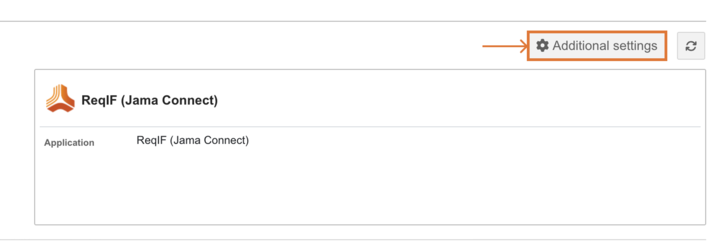
Select Import or Export, then select Additional settings.
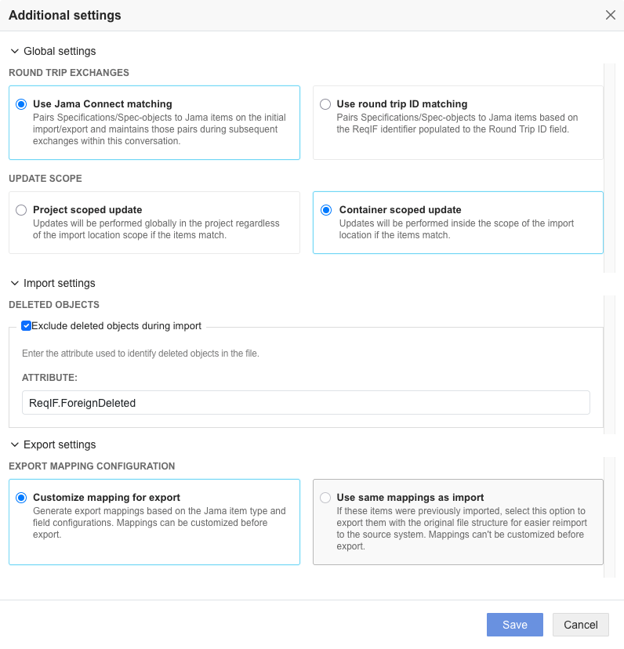
In the Global settings section, select one of these options:
Use Jama Connect matching (Default)
Use Round Trip ID matching
(Round Trip ID matching only) In the Jama Connect Round Trip ID field, enter the display name of the Jama Connect field that will hold the ReqIF identifier. For example, Round Trip ID.
In the Update Scope section, select one of these options:
Project Scope Updates
Container Scope Updates
Under Import settings:
Select Exclude deleted objects during import.
Enter the attribute that identifies deleted objects in the file. For example, ReqIF.ForeignDeleted.
Under Export settings, select one of these options:
Customize mapping for export
Use same mapping as import
Select Save.
The round-trip settings for ReqIF import and export are saved.
Example: Project Scope Updates
Import requirements into Folder A.
Update the ReqIF file (for example, change requirement names and descriptions).
Move one requirement from Folder A to Folder B.
Perform a subsequent import.
Results:
All matching requirements in the project are updated with the new content (for example, updated names and descriptions).
The requirement moved to Folder B is updated.
The requirement is moved back to Folder A to match the ReqIF hierarchy.
The hierarchy matches the ReqIF file.
Example: Container Scope Updates
Import requirements into Folder A.
Update the ReqIF file (for example, change requirement names and descriptions).
Move one requirement from Folder A to Folder B.
Perform a subsequent import into Folder A.
Results:
Requirements still in Folder A are updated with the new content (for example, updated names and descriptions).
The requirement in Folder B is not updated.
The requirement in Folder B keeps its original content and location.
The requirement remains in Folder B.
Only the hierarchy within Folder A is updated to match the ReqIF file.
Notice
When processing repeated imports within a conversation, if it's necessary to update existing items and change the location for Container Scope Updates, use the Round Trip ID matching instead of Jama Connect matching.